

Portable Applications
- 7-Zip - File archiver with a high compression ratio and built-in encryption functionality.
- ShareX - Lets you take screenshots of any selected area with a single key.
- Discord portable - Portable instead of the regular auto install.
- Libre Hardware Monitor - Libre Hardware Monitor, a fork of Open Hardware Monitor.
- HWiNFO - System Information and Diagnostics. Comprehensive Hardware Analysis, Monitoring and Reporting.
- Geek Uninstaller - Geek Uninstaller is a perfectly functional uninstaller. Also removes attached registry keys.
- Olive Video Editor Free open-source non-linear video editor.
- Twinkle Tray Monitor Brightness Slider. Make it portable by opening the .exe archive with 7-Zip and extract
Twinkle.Tray.v1.16.6.exe\$PLUGINSDIR\app-64.7z\to chosen location. - Fan Control Fan Control is a highly customizable fan controlling software for Windows.
- Notepad++ - Notepad++ is a great replacement for Windows notepad. It’s a good choice for beginners.
- VLC - VLC is a free and open source cross-platform multimedia player and framework that plays most multimedia files.
- qBittorrent - qBittorrent is a open-source BitTorrent client written in native C++. Search plugin
- Scrcpy - This application provides display and control of Android devices connected via USB or TCP/IP.
- yt-dlp - A youtube-dl fork with additional features and fixes. Works great with yt-dl-gui.
Also FFmpeg. copy the bin folder content to the folder that yt-dlp.exe is located at
(ffprobe, ffplay and ffmpeg). Settings to download with h264 or h265 codec:$ yt-dlp -f "(bv*[vcodec~='^((he|a)vc|h26[45])']+ba) / (bv*+ba/b)"And Filename Format%(autonumber)02d. %(title)s - Twitch GUI - A multi platform Twitch.tv browser for Streamlink. Works great with VLC.
- Everything - Locate files and folders by name instantly. Plus Everything Toolbar for the taskbar.
- SuperSlicer - Developed to provide users more control over their slicer than what was possible with PrusaSlicer.
- NVIDIA Profile Inspector - Open source third-party tool created for pulling up and editing application profiles within Nvidia display drivers.
- FreeTube - FreeTube is a YouTube client with a focus on privacy. Importing your Subscriptions
- SuperF4 Kill programs instantly with Ctrl+Alt+F4.
- AutoHotkey Macro-creation and automation-oriented scripting utility for Windows.
Emulator
Yuzu(Switch) To make Yuzu portable create a folder named “user” inside the installation directory.RIP March 4, 2024.- Dolphin (GameCube/Wii) To make Dolphin emulator portable create a .txt file named “portable” inside the installation directory.
- Cemu (Wii U) Cemu is already portable.
- PCSX2 Playstation 2 Emulator. Compatibility List
Decompilation projects with PC ports using your own ROM.
- The Legend of Zelda: Ocarina of Time (SOH) is built atop a custom library dubbed libultraship (LUS).
- The Legend of Zelda: Majora’s Mask 2Ship does not include any copyrighted assets.
N64 Recompiled PC ports
- Banjo-Kazooie PC Port of Banjo-Kazooie made using N64: Recompiled. Mods
- Mario Kart 64 Recompilation of MarioKart 64.
Web browsers
Firefox
- Mozilla FTP Installer. Ctrl+F search for the latest version.
- Mozilla FTP - Nightly Installer or Portable. Ctrl+F search for the latest version.
- Firefox Profilemaker Tool to create a Firefox profile with the defaults you like.
- Extras: Compact Mode
- Browser Extensions uBlock Origin SponsorBlock Imagus Buster Gumbo Mail Checker
Chrome
- Ungoogled-Chromium
Disable “Clear Cookies” to save settings and login information at visited sites.
chrome://settings/cookies - Chrome Bookmarks Recovery Tool Best way i have found to back up bookmarks from Google Chrome as a .html file to easily use with Ungoogled Chromium.
USB Tools & Operating Systems
- Rufus Rufus is a utility that helps format and create bootable USB flash drives.
- Ventoy Ventoy is an open source tool to create bootable USB drive for ISO/WIM/IMG/VHD(x)/EFI files.
- Tails Is a portable operating system that protects against surveillance and censorship.
- FAT32 Format FAT32 format tool.
DNS Blocklist - For a better internet
- HaGeZi’s Blocklist
- hBlock - Adblock
- OISD BIG
- Someone Who Cares
- Fingerprinting Blocklist
- Fademind’s 2o7 Network Trackers
- Encrypt The Planet - Windows Anti Spy
- Perflyst’s Android Trackers
- Crazy Max’s Microsoft Telemetry
- AI Blocklist
- AdGuard Home Network-wide ads & trackers blocking DNS server.
DNS queries
https://dns10.quad9.net/dns-query
https://dns.cloudflare.com/dns-query
https://dns.mullvad.net:443/dns-query
Windows
-
W10 IoT Enterprise LTSC - Build 19044.1288 Is a specialized version of Windows, with support until 2032 unlike the standard version that hits EOL on October 14 2025. LTSC Minimizes feature updates and is focusing on essential security and quality updates instead. This contrasts with the standard Windows 10 versions, which receive feature updates more frequently. You could also use a program like NTLite to edit the ISO and pre-set settings and or remove features/bloat.
-
W10 IoT LTSC Key:
QPM6N-7J2WJ-P88HH-P3YRH-YY74H -
HWID activation:
Open Command Prompt or PowerShell (Press the Windows + R, Type cmd or powershell and then press Enter.)
Copy and paste the code below:
irm https://get.activated.win | iex
Then press enter.
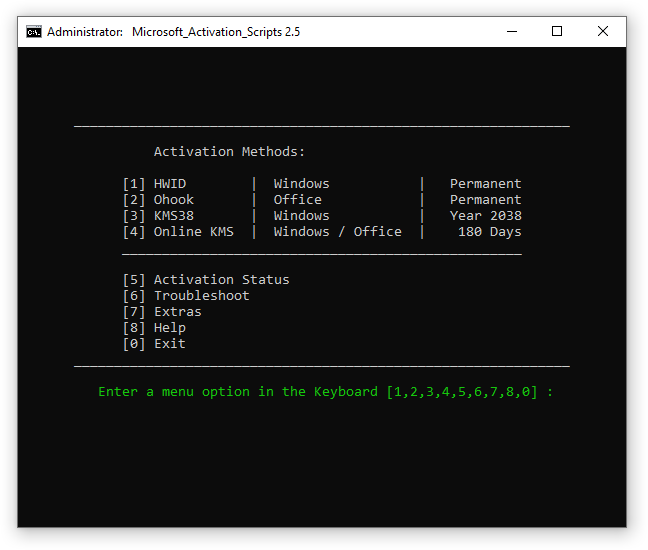
A window will open with different activation methods, press 1 for HWID (Digital License) Example
Stop Windows from overriding your drivers
Open PowerShell (Press the Windows + R, Type powershell and then press Enter.) and type gpedit.msc
Navigate to: Computer Configuration → Administrative Templates → Windows Components → Windows Update
And double-click: Do not include drivers with Windows Updates
Enable it and press OK.
Power Options
Press the Windows + R keys to open the Run dialog box.
Type powercfg.cpl and then press Enter.
Click the arrow “Show additional plans” and choose High performance.
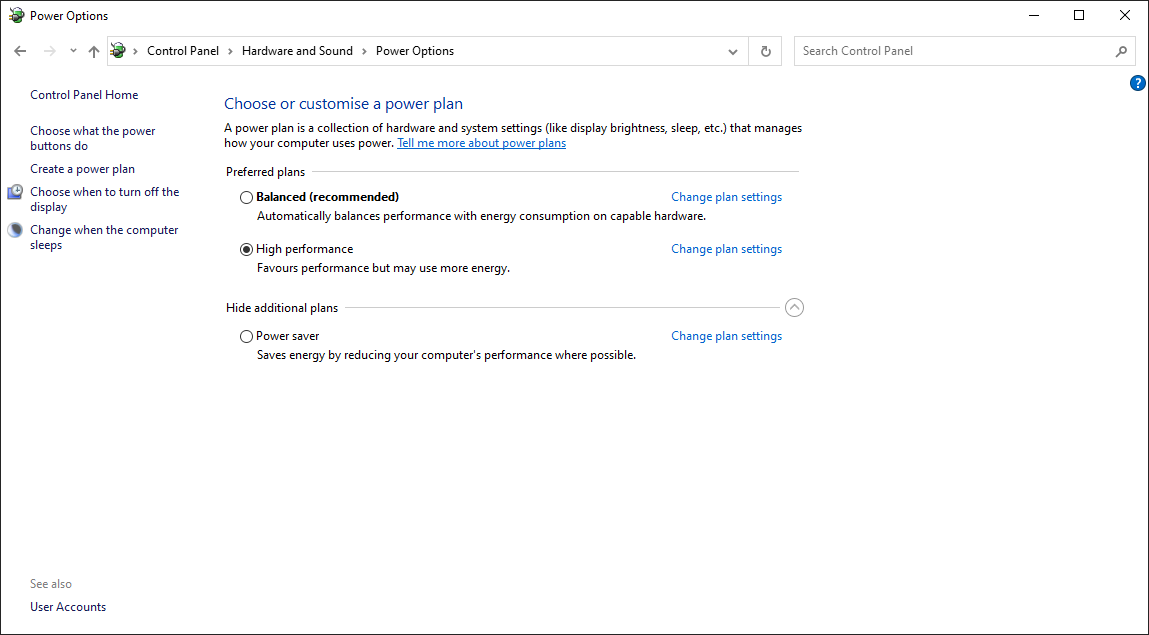
If it is missing, you can manually add the High Performance plan:
Press the Windows + R keys to open the Run dialog box.
Type powershell and then press Enter.
Type powercfg -duplicatescheme 8c5e7fda-e8bf-4a96-9a85-a6e23a8c635c in Powershell and press Enter.
Done.
Mouse Properties
Press the Windows + R keys to open the Run dialog box.
Type main.cpl and then press Enter.
Click the “Pointer Options” tab and unclick “Enhance pointer speed”
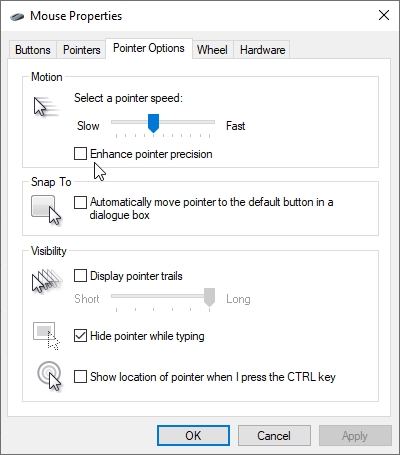
And click Ok.
Done.
Taskbar Clock
Press the Windows + R keys to open the Run dialog box.
Type Regedit and then press Enter.
Look for HKEY_CURRENT_USER\Software\Microsoft\Windows\CurrentVersion\Explorer\Advanced
Right-click the “Advanced” key in the left panel and select New > DWORD (32-bit) Value.
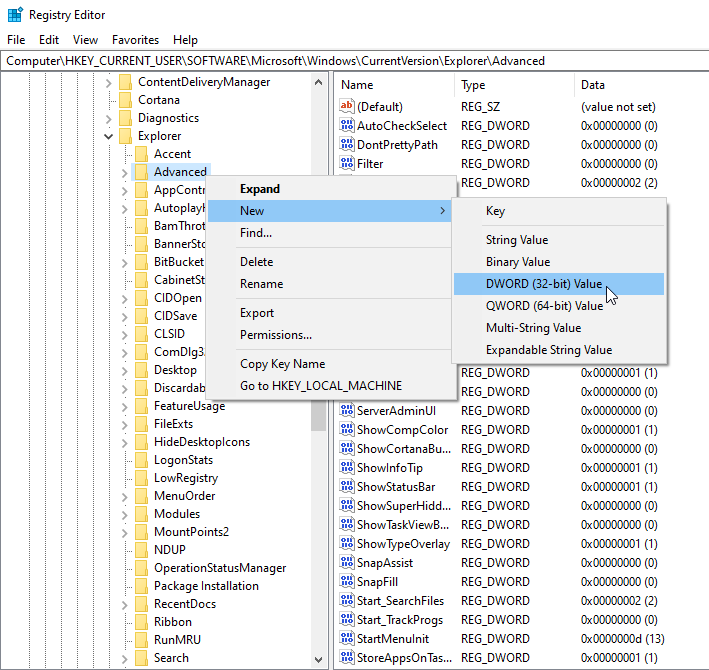
Name the value ShowSecondsInSystemClock and press Enter.
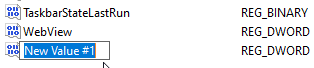
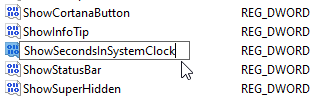
Double-click the value you just created, enter a value data of 1 and click OK.
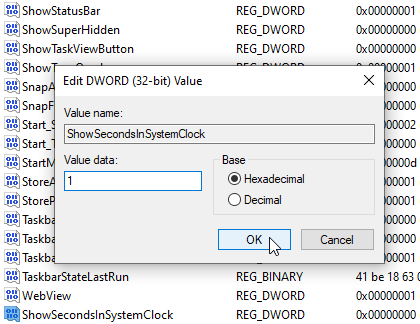
You can now close the Registry Editor. You will now have to sign out and in again or do the following command:
Press the Windows + R keys to open the Run dialog box.
Type cmd and then press Enter.
Then type taskkill /F /IM explorer.exe & start explorer in cmd to restart Windows Explorer.exe
And click Ok.
Done.
Require UAC Password
Press the Windows + R keys to open the Run dialog box.
Type Regedit and then press Enter.
Look for HKEY_LOCAL_MACHINE\SOFTWARE\Microsoft\Windows\CurrentVersion\Policies\System
Double-click ConsentPromptBehaviorAdmin
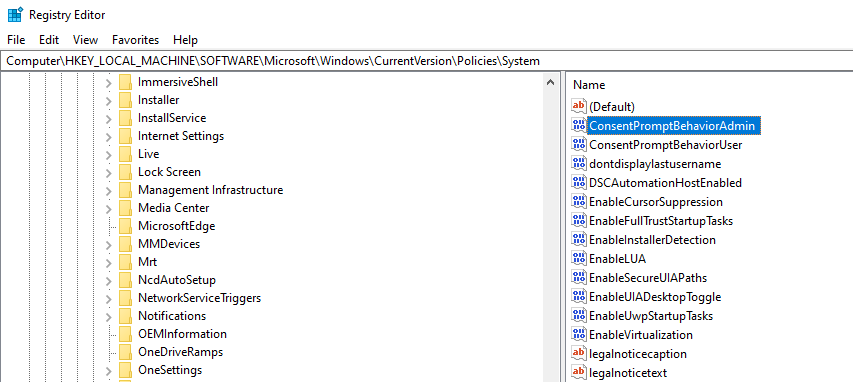
And set the value to 3. (Default value is 5)
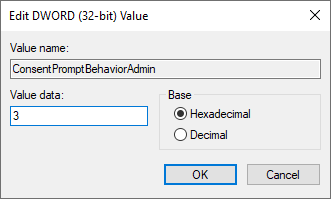
And click Ok.
Done.